Theme Layout
There are a few terms here that may not be familiar to Drupal developers. It's not important to understand how these technologies work in order to understand the theme. It is important to understand what problems these technologies are trying to solve.
| Technology | Problems Addressed |
|---|---|
| webpack | * Bundling js / css * Compiling sass to css * Processing es6+ javascript to browser-friendly javascript |
| yarn | Replaces npm as the package manager of choice (see yarn workspaces for the why?) |
| Node Package | An isolated bundle of functionality (could be js, twig, css, you name it) |
| monorepo | A single repository that contains multiple individually usable, but related Node Packages. |
| yarn workspaces | Allows us to build a monorepo by treating local Node Packages as if they were installed with NPM. |
Node Package Management
The theme uses yarn to manage dependencies between node packages. This replaces npm, which was used in previous iterations of the theme.
See migrating from npm to yarn.
The Theme as a Node Module Monorepo
At a high level, each theme is a monorepo.
The packages folder contains Node module packages that can contain components, javascript or sass libraries, command line tools, or any other reusable chunk of code.
The layout is similar to the bolt packages directory in the bolt repository.
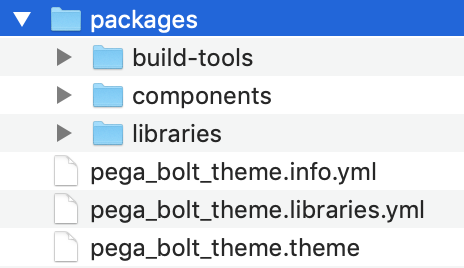
The components directory should contain Node packages that contain a single UI component each.
The libraries directory should contain javascript or sass libraries that aren't intended to be directly included by Drupal.
The build-tools path, like the build-tools package in bolt, contains the meat of the theme's build system integration with webpack and the bolt build tool.
The Theme as a "Drupalism"
Drupal twig templates go in he templates folder at the root of the theme and each theme will have a .theme file containing the preprocess functions for the theme.
If you are theming a Drupal template this is where most of your time will be spent.
Parent / Child Theme Relationships
The most common theme stack arrangement is shown below.
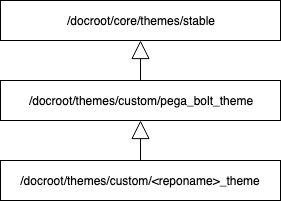
The Drupal active theme is the lowest theme on the stack. It uses pega_bolt_theme as a base theme, which uses stable as a base theme.
Important
You should perform all gulp commands through the lowest theme in the stack (usually the <reponame>_theme.
The Theme does not Contain Bolt
Bolt is installed as a separate package. It is not installed with, or compiled in the theme.
See the bolt release repository.
Webpack and the Bolt Build Tool
From a developer perspective we use gulp to compile css and javascript. In the background, this is using the bolt build tool, which ultimately uses wepback to bundle front end assets.