Setting up pega_bolt_theme for the first time
To start using the Bolt theme you first need to install the theme and a bolt-release.
Note
Bolt is compiled separately from the theme and included as its own composer package.
Install composer dependencies
Before installing the base theme or bolt itself, you will need to install the pega/bolt-release-installer package:
composer require pega/bolt-release-installer
This pacakge tells composer to install bolt releases to /docroot/bolt. Having a standard install location helps avoid unecessary .htaccess rules to make webpack dynamic includes work.
With the installer already in place, next install the latest stable version of pega_bolt_theme and the latest bolt release:
composer require pega/pega_bolt_theme pega/bolt-release
Tip
See the Dependency Managment section for information on managing the installed bolt version.
Create a subtheme using the starterkit
It is not strictly necessary to create a subtheme, but it is reccomended.
Download the pega_bolt_subtheme project to your docroot/themes/custom folder.
Edit the subtheme as follows:
$theme_name should be replaced below with <repository_name>_theme.
- Rename the folder to
$theme_name - Edit
package.jsonand change thenameentry to$theme_name. - Edit
pega_bolt_subtheme.info.ymland change thenameanddescriptionkeys to appropriate human readable text. mv pega_bolt_subtheme.info.yml $theme_name.info.ymldrush cr- Ensure
/docroot/themes/custom/pega_bolt_themeis in.gitignore git commityour subtheme
Caution
Your subtheme and pega_bolt_theme must live in the same directory in order to work out of the box. eg. docroot/themes/custom/pega_bolt_theme and docroot/themes/custom/pega_bolt_subtheme.
Enable the subtheme in Drupal and make it the default theme
Navigate to the /admin/appearance page in Drupal and set the subtheme you created as the default theme.

Enable and Configure the pega_bolt_connect module
fin drush pm-enable -y bolt_connect
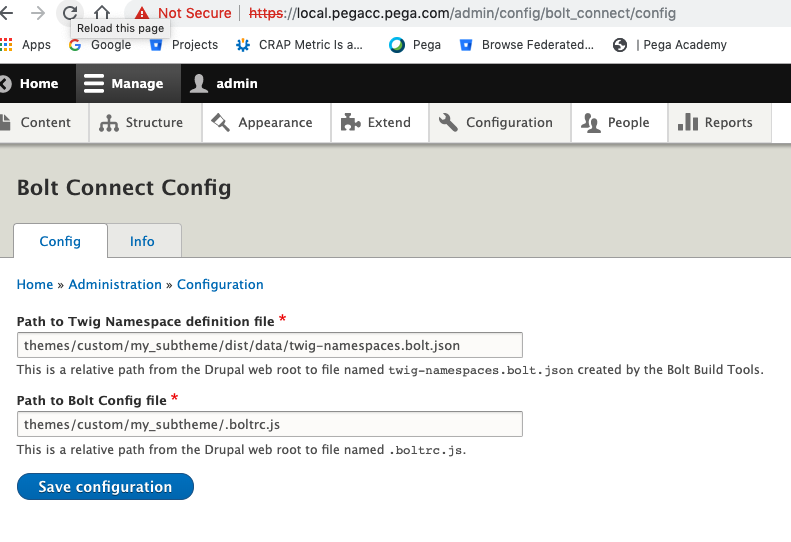
Navigate to /admin/config/bolt_connect/config. Change the settings as shownbelow, replacing my_subtheme with the name of the subtheme you enabled before.
Finish the Installation
After compiling your front end assets as described in the next section and clearing the Drupal cache the installation will be completed.